

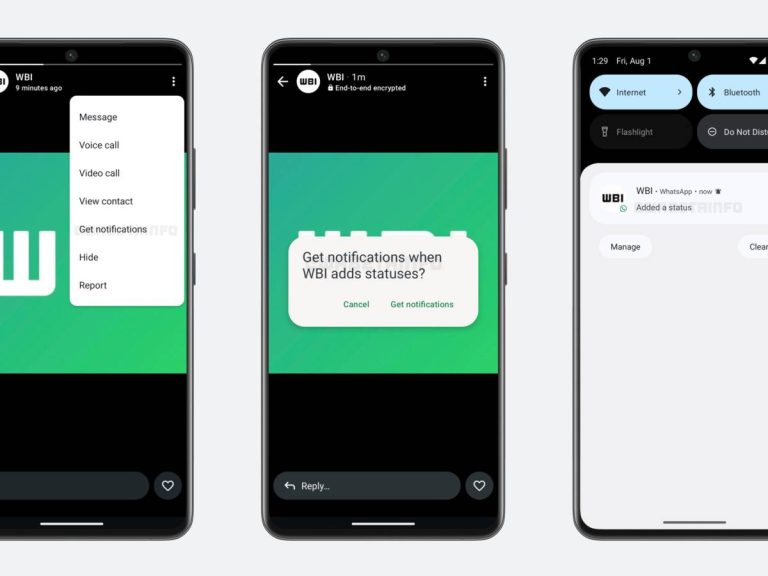
The development team of WhatsApp It is at work to soon make available to users a function that allows you to manage the state update notifications of their contacts independently and personalized.
A first novelty in this sense, anticipated by the release of Beta for Android 2.24.22.21, had arrived in October last year. This notification option, which can be activated by the settings-Notifications-Promemean settings, however it behaved in a completely way automaticsince the user only the state updates of the contacts of the contacts with which he used to interact more often were forwarded. No possibility of setting the selection of the most interesting or important ones: the system autonomously made its choice.
The programmers are operating to overcome this automatism and allow the users of the famous instant messaging app by the destination to carry out a targeted sorting, obtaining control over how and when to receive the warnings. To preview this novelty, inserted within the latest WhatsApp Beta update for Android 2.25.22.10, they were once again the experts of Wabetainfo.
The functionality will therefore allow users to manually choose whether or not to receive a notification every time a specific contact publishes a new state update. This is an option that will be particularly useful in order not to lose the novelties of relatives, friends or contacts to which it is particularly held in the Mare Magnum of notifications that can also arrive on the mobile phone from accounts connected exclusively to work daily. Users will be able to manage these notifications directly from the status refresher screen, using a dedicated option to check the notices for contact you are viewing. To activate the notification, simply click on the profile that interests us, then on the three dots at the top right and select “Receive notifications”. In case of modification of the state, Whatsapp will notify the user with a notification by inserting the name and photo of the contact to make its recognition more simplice even outside the app.
At any time, if you change your mind, you can remove the notification command following the same path necessary for its activation.
Another aspect Importanete is that relating to privacy: The notification option for state updates is a private action, so the owner of the profile will not be informed that someone has chosen to receive notices on his activities, ensuring maximum discretion.
WhatsApp Beta for Android 2.25.22.10: What’s New?
WhatsApp is working on a feature that notifies users when selection contacts share new status updates, and it will be available in a future update! Https: //t.co/Owux9edxxn pic.twitter.com/dumbamn0ua
– Wabetainfo (@wabetainfo) August 1, 2025